AI workstation · Ep. 2
How I Chose the Hardware for a $13,800 Home AI Workstation
In episode 1 I ended with three open questions for the reseller — PSU wattage, GPU provenance, warranty on a later GPU swap — and a promise that the hardware decision would be next. Here it is.
The three reseller questions, and why I asked them
PSU wattage. The RTX PRO 5000 Blackwell has a 300 W maximum power limit. I needed a written figure for the PSU with enough headroom to hold the GPU at its full 300 W while the CPU sustains all its cores, because “will be fine” is not a wattage.
GPU provenance. The RTX PRO 5000 Blackwell is a workstation SKU, not a gaming card that got relabelled. That mattered for three reasons: it is the class of card the model ecosystem is actually tuned for at 48 GB, it is sold new through an authorized channel with a genuine part number, and the memory is ECC-adjacent tooling at the driver level. A used or mining card with a sticker over the label would have been a different decision.
Warranty on a later GPU swap. The honest prediction is that in eighteen months the GPU in this box will not be the GPU I bought. I needed a reseller who would confirm a later GPU swap is a supported upgrade path with the warranty carrying over.
Why this config, and why not bigger
The tempting move is to spend the same budget on the biggest GPU you can find and buy the rest of the machine to fit it. In episode 1 I argued against this directly: “the biggest number you can afford” loses. Here is the reasoning applied to the final spec.
VRAM is the ceiling, but it is not the whole floor. 48 GB of VRAM on the RTX PRO 5000 fits the models I actually want to run — a 27–35 B dense or MoE model at Q4_K_M, with 32K context, resident in VRAM with room to spare — without splitting the weights across GPU and CPU. Splitting is how you end up with a model that is “available” on the spec sheet but takes ten seconds per token in practice.
System RAM matters for the off-GPU work. The embedding model, the guardrail model, the small routing model and the working set of the CPU-side runtime all live in system RAM. 128 GB in four matched DIMMs is the number that keeps all of those in memory at the same time, not just the main model.
The CPU is not doing inference. It is doing everything else. The Core Ultra 7 270K Plus with 24 cores and 24 threads runs the runtime, the file server, the network stack, the audio pipeline for Jambu and the OS. I did not buy a HEDT part, because I did not have a workload that needed one, and I did not buy a chip with a low core count, because the OS and the runtime both like to have work to do.
The disk is where the models live. A 4 TB NVMe holds a dozen models — from a 3B routing model up to the 35B MoE — plus the working copies, the embeddings index and the operating system. At that total size, the models need to be on local NVMe, not on a NAS, or every startup pays a network tax I do not want to pay.
The final spec
| Component | Choice | Notes |
|---|---|---|
| GPU | NVIDIA RTX PRO 5000 Blackwell, 48 GB VRAM | Workstation SKU, 300 W max power |
| RAM | 128 GB DDR5-5600 (4 × 32 GB) | All four slots populated, matched |
| CPU | Intel Core Ultra 7 270K Plus, 24C / 24T | Sized for runtime + OS, not inference |
| Storage | 4 TB NVMe | All models and runtime resident locally |
| Chassis | HP Z2 Tower G1i Workstation | Single-box form factor sized for the GPU |
| OS | Windows 11 Pro | NVIDIA driver + CUDA confirmed working |
| Runtime | Ollama | 12 models in the local library at the time of writing |
The bill
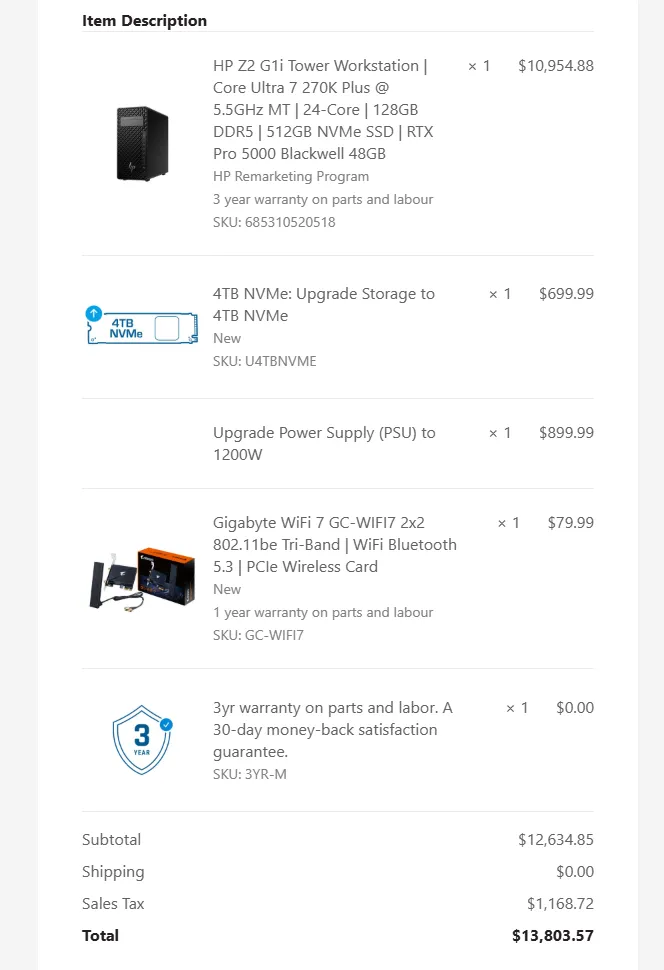
The final bill: $13,803.57 including sales tax. The single largest line is the GPU, as expected. Everything else — RAM, CPU, storage, chassis, PSU — is sized to not be the bottleneck, which is exactly the reverse of the “buy the biggest GPU, fit the rest to it” move I did not make.
What this box is, and what it is not
This is a machine I can run my own models on, on hardware I own, with the data staying inside the four walls of the house. It is not a benchmark rig. It is not a general-purpose workstation for someone else’s workload. It is one box doing one job — running open-source models locally for chat, code, documents, speech, images and video, and later for the brain of Jambu.
The 12 models currently in the local library are the answer to episode 1’s “can these models do my work” question, and they are what the rest of this series is going to run on.
What’s next
Next is first boot, and the failures that always come with a first boot. The box slept on me, dropped the network, and stayed down — so I had to build the two things that now keep it alive and tell me when it is not: a per-minute watchdog and a health monitor that emails me. Then the first local inference run — the same lidar test from episode 1, but now against hardware I own, with the numbers I can actually defend.
If you’re new here, episode 1 is where I tested the models before buying anything, and how Jambu works is the short version of the robot side of the story.